
Cyber Safety Guy Review: Salfeld Child Control
Finding Balance in the Digital Age


As a cyber safety advocate, I know and have told you previously that the digital world is a double-edged sword. It offers huge opportunities but also exposes children to significant risk and danger, from offensive content and online sexual predators to the real psychological harm that can be related to excessive screen use.
That’s why parental control applications like Salfeld Child Control are becoming an essential part of the modern parenting toolkit. Salfeld Child Control aims to be an intuitive and robust solution to help parents manage screen time and ensure online safety for their kids.
Here is my in-depth look at what Salfeld Child Control offers, specifically addressing the needs and concerns of parents today.
I received a license key to be able to assess the functionality of this platform, but as with all of my reviews of parental control apps, I have no affiliation with the provider and have received no remuneration to provide this review.
I am, as always, only interested in what these apps can do to assist you in protecting your children.
⚡Please don’t forget to react & restack if you appreciate my work. More engagement means more people might see it. ⚡
Features & Benefits
I will detail some of the features that I tested on my Android device, but note these are also usable on Windows computers, although I did not test those.
Robust Screen Time Management
The struggle to get kids off their devices is very real and one that I hear about a great deal from parents and teachers!. This platform provides features to enforce healthy habits, but it could also be used to restrict access during school hours to prevent them from being distracted during class!
Flexible Limits: Parents can set daily, weekly, or monthly time limits on overall device usage. Once a limit is hit, the computer automatically shuts down, or the smartphone displays a lock screen after a few warnings.
Customised Schedules: You can create customised schedules and restrict access at specific times of the day, with blocked times configurable in 15-minute increments.
The Roaming Feature: A standout function is cross-device time counting (Roaming). By enabling Roaming in the web portal, screen time is tracked consistently across all linked devices, preventing children from simply switching from their Windows PC to their Android device once their time runs out.
Incentivising Good Behaviour: Salfeld includes a reward system that allows parents to issue Time Codes (6-digit numbers) as rewards for good behaviour, chores, or homework. You can also designate certain apps as “bonus apps”, which automatically add extra time, a great way to encourage learning first, then play. This is a feature I haven’t heard of before and is one that I like, as I have always believed children are more receptive to the carrot rather than the stick!
Comprehensive Content and Application Control
Protecting children from harmful content should always be a priority, alongside reducing distractions from crappy apps (TikTok, Snapchat, etc, although that’s just my personal opinion as apparently ‘normal’ people love them 😁).
Web Filtering: The app allows parents to enforce web filters that block inappropriate content based on categories or age settings. You can also customise allowed lists using a blocklist/Allowlist approach. This feature minimises the risk of exposure to inappropriate material like violence or pornography.
Application Management: Parents can manage their children’s access to specific apps and programs. This includes setting time restrictions for unsuitable apps or grouping related programs (like games or social media) to apply limits to the entire group.
Unlock Requests: If content is accidentally blocked, children can send an unlock request, and parents receive instant notifications.
Monitoring and Safety Features
The app offers adults comprehensive insight into their children’s behaviour and interactions on the internet.
Detailed Activity Reports: You can track browsing behaviour, view detailed reports on websites visited, searches, and applications used. The information gained helps parents understand the type of content their kids are consuming.
Suspicious Activity Detection: The app includes features designed to detect problematic keywords or suspicious activity, which can help identify potentially dangerous situations such as cyberbullying, sexual harassment, or the sharing of personal information with strangers.
Geolocation: The app provides advanced geolocation features, allowing adults to monitor their children’s whereabouts, ensuring safety when they are outside the home.
Remote Access and Reporting: Parents can manage all Salfeld Child Control settings easily through a web portal (accessible from any standard browser, including iPhone, iPad, or Mac) or via a dedicated parent app. You can also opt to receive daily or weekly email reports for a clear overview.
Technical Details and Platform Support
Salfeld Child Control is designed specifically for Windows and Android devices. While it supports these platforms, management can be conducted from anywhere, web-based, including from an iPhone or Mac.
While the software provides a simple interface, it is worth noting a common parental challenge: some users find that the extensive range of features and settings can make the user interface a bit overwhelming, and some advanced configurations might require technical knowledge.
The web portal is feature-rich, although the manual and support available are extremely useful and always remember I am here to assist any of you who have any issues when it comes to protecting your children.
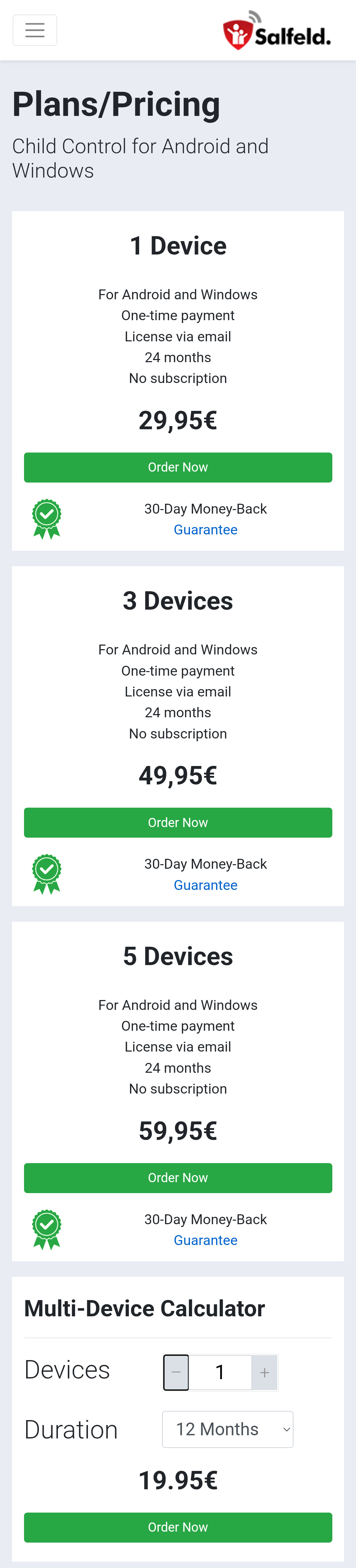
Salfeld Child Control is a commercial software, with pricing starting at €19.95 for 1 device for 12 months.
Final Verdict
Salfeld Child Control is a powerful ally for parents seeking control, flexibility, and peace of mind. It has good functionality. Reviews I have seen are positive and most of the low ratings often come from children giving it one star precisely “because it does what it’s supposed to do”.
However, as helpful as any parental control app is, remember my main principle of online child safety: these apps should not be viewed as a foolproof solution for open communication and a trusting parent-child relationship. Regular conversations about online risks—like phishing, scams, and handling private information—are essential to developing responsible digital behaviour.
If you are looking for a robust, feature-rich solution for managing screen time and filtering content on Windows and Android devices, Salfeld Child Control is certainly worth considering. You can test its effectiveness with a free 30-day trial (no credit card needed; it ends automatically).
Any questions, comments or suggestions, as always, feel free to reach out to me for a chat!
As always, thank you for your support. Please share this across your social media, and if you do have any comments, questions, or concerns, then feel free to reach out to me here or on BlueSky, as I am always happy to spend some time helping to protect children online.
Remember that becoming a paid subscriber means that you will be supporting two charities that are very close to my heart and doing amazing things for people. The Not Forgotten Association and Childline, as I will split all subscriptions 50/50 and donate to each charity every six months, as I don’t do any of this for financial gain.
